
IdeaTree
IdeaTree is a web-based application for collective concept map creation and editing, first launched in 2004. IdeaTree was originally designed in response to a need for interdisciplinary collaborators to share documents and bookmarks while maintaining a representation of how the documents relate to each other. Shared information is represented in the form of a concept map or mind map of links. To keep a record of discussion AbOUT the shared content, mini-blogs are attached to each visual link marker in the map. The shared content May Be user-supplied text, uploaded documents, or external Internet sites.
IdeaTree is compatible with most Standards-compliant browsers across major platforms (Mac, Windows, Linux). Neither Flash nor Java are required, which makes it compatible with platforms (iPad, iPhone) where one or both of these are not available.
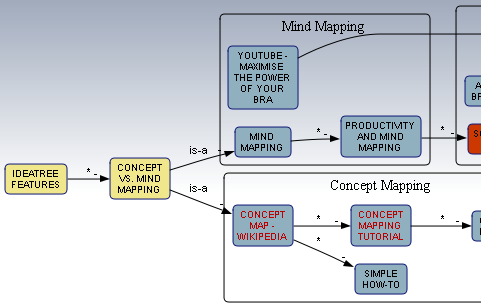
As with other concept mapping systems, IdeaTree is free form. Hierarchies are not enforced and any given topic can connect to any other topic or may stand alone. This differs from mind maps which are built around a single conceptual center, though IdeaTree and other concept maps can also be used as mind maps.
Features
- Collaborative groups view the same map in real time.
- Early versions of IdeaTree were criticized for utilizing dialog boxes for map editing. Versions released in 2009 or later did away with dialog boxes for simple operations and allow maps to be created and edited using only drag and drop or keyboard commands except as needed for editing stored content or to display lists of items.
- Topic mouse-overs show thumbnails of topic contents, username of its contributor, date, and number of comments submitted.
- One-click entry of websites via a button on The Browser toolbar. When clicked, the website currently being viewed is entered into an IdeaTree map with no further intervention.
- IdeaTree exports to the Instaviz iPhone application for mobile display and editing.
- A REST-inspired API (Application Programming Interface) implemented in Javascript allows embedding of IdeaTree maps into websites without using the full IdeaTree interface.
- Graphical layout occurs in one of two modes:
- In 'manual placement' mode topics may be dragged to any empty location and are pinned to that location.
- In 'automatic placement' mode the entire map is laid out algorithmically in a manner that minimizes the number of crossings of the lines that connect topics. Automatic placement mode is provided to
- PReVENT disagreement among a collaborative team as to where topics should be placed
- remove the necessity to specify x,y positions when embedding IdeaTree maps in other websites using the API
- provide the ability to group similar topics together into visual 'clusters', each with a title and border
- In keeping with its design as a meta layer map over deep content, summaries may be opened to view the contents of all topics linearly, in text-form, as if Laying out all the content on a desktop for viewing and searching.
- Comments may also be summarized in similar fashion.
- Maps can be connected to other related maps by visual "tunnels"
- As with other concept maps, vectors may be labeled using a predefined list of common labels ("is-a", "has-a"), or user input.
- 'Solution' topics may be defined to suggest decision points, and a rudimentary voting mechanism allows the solution to be voted upon, enforcing one vote per map per user.
See Also
- concept mapping
- mind mapping
- List of concept mapping software
External links
- Popular Logistics
- Mindmapping Software Blog
- Software for Mindmapping
- Instaviz
- Creativity, Dr. E. Sefertzi
- Mindmapping 2.0