
RNS-E
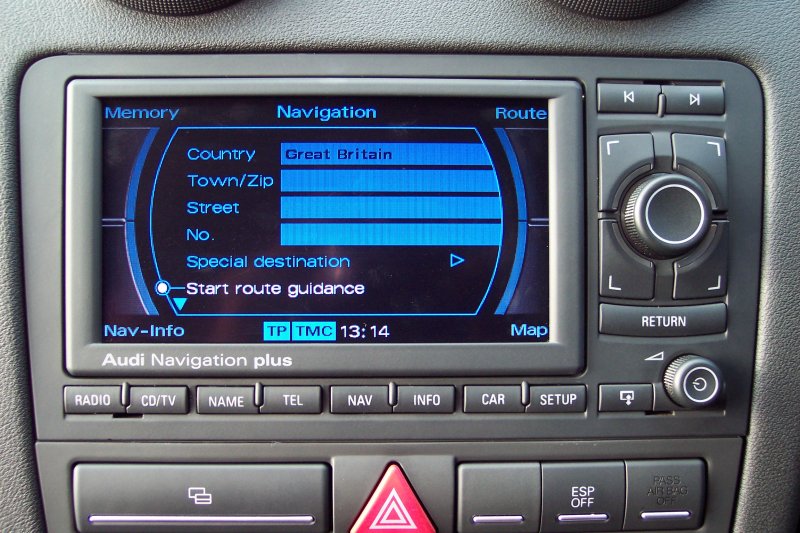
Audi Navigation plus
RNS-E is the manufacturer name for an in-car entertainment and DVD based navigation system (often shortened "sat nav") for Audi cars, branded Audi Navigation plus. RNS stands for "Radio Navigation System." It has been offered since 2004, when it superseded the CD based RNS-D system. The RNS-E is manufactured by Aisin Ltd. in Japan for Audi and is currently available for Audi A3, A4, R8, and TT models '07 or later. (Other Audis offer the MMI system instead.)
The RNS-E is a self-contained double-DIN size unit. It has a folding 6.5-inch TFT screen to the upper left of its fascia with eight function buttons across the bottom. Next to this is a button to lower the screen, behind which is a CD/DVD slot (used mainly for the map data DVD) and two SD card slots. These allow the passengers to enjoy listening to MP3 music, although the RNS-E will also play normal audio CDs.
As well as the rotary power button in the lower right, which also controls the volume, there are four larger buttons and another, larger rotary knob that allow the user to select options on the screen. There are three variants for each vehicle it is fitted to; in principle, the only differences are to the fascia, which varies to fit perfectly into each model's dashboard, and in some of the electronic connectivity to the cars.
Satellite Navigation
Using DVD discs to store map data means whole continents are available from at once; for instance, North American, Western and Eastern European map DVDs are available with navigation to street level.
It is possible to save destinations into the unit's memory, with preferred routes and stopovers also selectable. When selecting a route, often multiple choices will be offered to the driver dependent on their preferences (such as the shortest or fastest route, with preference to motorways or freeways etc).
A female voice provides instructions. While the voice is not customisable, a large database of words are provided, including names of many major cities and towns. This helps when navigating along major routes. The voice can also read out any road numbers by pronouncing each letter and number individually. The voice is customised for each destination market too, so for instance in the UK, the commands are spoken in an English accent.
Special places of interest (often referred to as POIs) are also stored on the map DVD, which are not only available as searchable destinations but appear on the map as ICONS. Audi dealerships also appear, with the Audi logo appearing on the map. Unlike portable satellite navigation devices however, it is not possible to add custom POIs - such as the popular fixed speed camera databases often used in Europe - to the device.
The TFT display changes during navigation too. At intersections/junctions, the display splits to show a detailed view of the road layout on the left, with an arrow directing you through it. On freeways/motorways, exits are shown (with the relevant exit number and a countdown in minutes until you arrive to it) with a very useful lane display to help you leave the road if required. The view also has a zoom feature; you can view the map at a resolution of 82 yards or several miles which shows most of the continent you're in.
Updates are provided by NAVTEQ via new DVDs, and sometimes these incorporate software changes (although software updates can also be provided on CD too). These are normally released every twelve months or so.
Audio
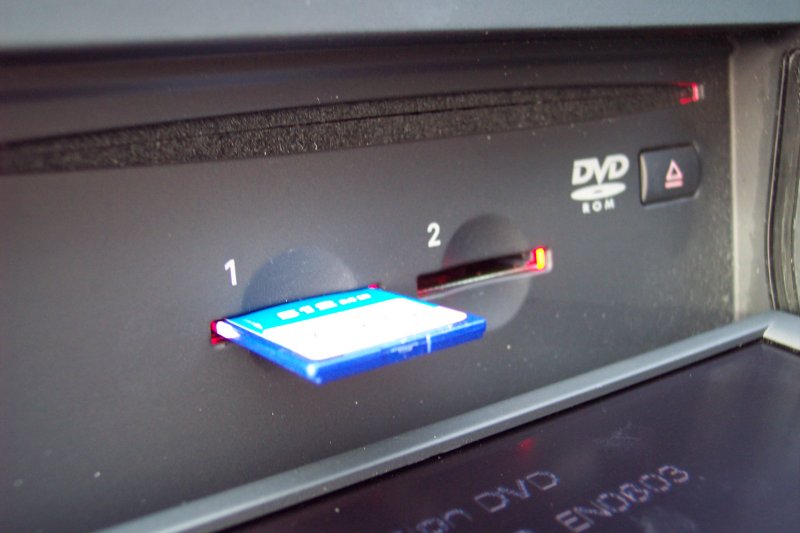
Since the CD/DVD slot is, in day-to-day practice at least, almost exclusively used by the map DVD, two SD card slots are available to play MP3s. Audi recommends that cards up to 256MB should be used, but cards up to 4GB work well (but note that only standard SD cards are supported and not the physically-identical SDHC card type). The cards only need formatting to Windows FAT or FAT32 format using a suitable PC reader to transfer them, while the MP3 filenames (and any folders) must not exceed 64 characters in length. There is also a 512 file/folder limit on each card (ie the total number of files added to the total number of folders must not exceed 512 or the card will not be recognised as containing any files).
Playlists in M3U format are also supported, and if not using the navigation screens, the playlist is shown with all the tracks in the display. When navigating, two Back and Next style buttons in the upper right of the fascia allow passengers to skip through tracks.
Of course, radio is available with both AM and FM bands supported. In the US, it is possible to receive XM or Sirius satellite radio. With RDS (Radio Data System) standard too, all the usual benefits such as programme type selection and traffic information (TP) are also provided.
Further Options
At extra cost, it was also possible to purchase further factory options for the RNS-E when ordering an Audi car.
Bluetooth
The first of which is Bluetooth connectivity, which allows a driver to utilise their mobile phone while in the car. As well as managing incoming and outgoing calls, with the caller's voice being heard through the car's speakers and any radio station or MP3 music muted, a connected phone's address book is also accessible on screen. In many countries, using a mobile phone while at the wheel is illegal but in some cases, the UK included, this "hands-free" approach is acceptable.
TV
There is also a TV option, that uses a receiver to display TV output through the screen - but only while the vehicle is stationary, for safety reasons. It is possible to add other auxiliary input from other devices, including DVD players or games consoles.
Satellite Radio
In the US, connectivity to XM and Sirius satellite radio is also available. The European and US units do differ slightly and run different software versions, allowing the US units to receive this.
Other Features
Traffic Message Channel
In most of Europe, including the UK in 2007, the welcome addition of TMC (Traffic Message Channel) via a software update to the RNS-E helped drivers avoid traffic jams. TMC information is relayed via RDS from various radio stations and used to pinpoint trouble-spots on major routes. Should the driver be heading towards one of these, a Verbal Warning is issued by the RNS-E and, if in navigation mode, they can be automatically directed around the traffic problem. Icons are used on the map to warn of the troublespot location.
Engineering Mode
The RNS-E also includes an engineering mode that allows access to additional facilities useful during installation and fault finding. Due to the nature of these features this mode has been designed to be accessed only with specific knowledge (there are no physical buttons, menu items or cursor-buttons that can be used to access it directly, and it is not mentioned in any of the documentation supplied with the RNS-E or vehicle) so that the CASUAL user does not stumble upon these facilities.
To access the engineering mode the following sequence of actions must be followed:
- Start with the RNS-E turned off.
- Turn on the RNS-E.
- Press the NAV button and release.
- Press and hold the top-left cursor button for five seconds and then release it.
- Press and hold the top-right cursor button for five seconds. Hold this button until the screen changes to the engineering mode.
The engineering mode screens don't follow the conventions of the normal RNS-E screens - they utilise a different font and don't use the corner cursor buttons to enter sub-modes in the conventional way. To navigate around the menu items on the engineering mode screens use the control knob to highlight the required item, and then press the control knob to select it.
To leave engineering mode the RETURN button on the RNS-E can be pressed to exit engineering mode screens until the normal RNS-E display reappears. Alternatively the RETURN item on the top-right of the engineering mode screens can be highlighted and used in the same way.
The screens accessible in engineering mode show technical data, including:
- RNS-E data, including hardware and software version numbers, navigation data version number, and unit serial number.
- Vehicle VIN.
- GPS sensor data, showing received satellite data, computed position (as a latitude and longitude) and last recorded bearing (presumably based on the last detected movement direction).
- Gyroscope sensor data, showing the bearing detected by the inbuilt gyroscope.
- Vehicle sensor data, showing detected vehicle speed based on received pulses generated when one of the vehicle's wheels rotates when in contact with the road (this function's correct operation depends on the RNS-E having the correct wheel diameter - something it can learn over time based on the received sensor data and the GPS-derived vehicle speed).
As well as displaying data, these screens also allow access to some specialist functions, including:
- Screen-shot mode (described below).
Screen-Shot Mode
The RNS-E includes the ability to capture screen-shots from the display and store them on an inserted SD card. This facility is enabled through the engineering mode. To enable the function enter engineering mode and enable the SCREEN SHOT MODE toggle on the GENERAL screen.
Screen-shots can be recorded from within both the engineering mode screens and also from within the normal RNS-E screens once engineering mode has been exited. To record a screen-shot navigate to the required screen that is to be captured and press and hold the >| (next-track) button until the screen goes temporarily black, then release it. The button needs to be held for approximately Six seconds.
The screen-shots are recorded in BMP format to the SD card in slot 1, in a folder called "SCR_Shot".
The screen-shot mode stays enabled until the mode is disabled from within the engineering mode - it is disabled in the same way that it is initially enabled.
Integration with the Car
One of the best features of the RNS-E is the way it operates seamlessly with the rest of the vehicle. Navigational commands can be displayed in the DIS (Driver Information System) panel between the speedometer and rev counter, it is illuminated when the external lights are turned on (which also automatically reverses the map colours so the screen isn't too bright when driving at night) and retrieves a lot of speed and wheel position data from the Audi's CAN computer system.
The latter allows precise prediction of estimated arrival times, not just for selected destinations but also waypoints such as freeway or motorway exits. This information, along with remaining mileage, mileage until the next instruction, road name or number and even a compass also appear in the DIS panel. Particularly useful too is a countdown bar in the panel as the driver approaches a turn from approximately 100 yards away; a fantastic feature in cities, where intersections or junctions May Be close together.
A further bonus is theft prevention. The RNS-E will not physically fit into any other vehicles without extensive modification, and due to the integration with Audi's CAN system it would not work correctly even if fitted. It also has a security code which must be entered if removed from the car, and requires four keys inserted simultaneously into the RNS-E to remove it. This is particularly reassuring during a time when mobile satellite navigation devices are being stolen from cars in large numbers.
Retrofitting
Impressive as the RNS-E is, it is nonetheless a very expensive option new (2175 GBP in the UK market) which makes it relatively rare. However, it is becoming more and more popular to "retrofit" the RNS-E into an Audi. This involves purchasing a new or used RNS-E unit, removing the existing stereo equipment, and installing the RNS-E into the car.
In some cases, depending on the factory options fitted, retrofitting can be very straightforward; almost as simple as installing the RNS-E into the dashboard, plugging in a GPS antenna and a custom wiring adapter, and powering up the unit with a map DVD. While not a great deal is known AbOUT the software that runs it, a few websites have sprung up dedicated to the RNS-E where owners and installers share and build up a great deal of knowledge as to how the RNS-E should be installed.
See also
- Audi Motor Cars
- Satellite Navigation